
Stop guessing which ads make you money.
Connect Meta Ads and your Shopify or WooCommerce store. See ad spend next to real orders, product costs, shipping and fees, so you know which campaigns deserve attention.
The free check reads orders from Shopify or WooCommerce today. With another platform you join the waitlist instead, and we tell you when yours is supported.
- No card for the free check
- Read-only Meta access
- Delete your data any time
- Your free Ad Waste Check shows
- Ads of the last 90 days that spent money and brought no order (new and learning ads left out)
- Orders from your Meta ads that Meta did not count
- What stopping those ads earlier could have saved, as a low estimate, on screen and as a PDF by email
Meta reports
Your store shows
Per order from this campaign:
Meta’s ROAS looks healthy, but after product costs, shipping and fees, each order from this campaign costs about $15 more in ads than it earns.
Meta can’t see all your sales. GrowViking sends them from your server.
Ad blockers, Safari and cookie choices hide purchases from the Meta Pixel, so Meta learns from fewer buyers than you really have. GrowViking reads your orders and tells Meta about each paid one through the Conversions API.
- Every paid order sent to Meta once, with its value and products
- The same event id as your pixel, so Meta counts each purchase once
- You switch it on; buyer details are shared only if you tick that too
- How Tracking works →
A good ROAS doesn’t always mean you made money.
Ad platforms report the sales they believe they caused, before your costs. Your bank account sees something else. GrowViking puts the two side by side.
- Product cost, shipping and feesA 3.0 ROAS can lose money on a low-margin product.
- Different ways of countingMeta counts views and modelled sales; your store counts orders.
- Profit after adsWhat each campaign leaves you once everything is paid, when your costs are in.
From reported value to profit after ads
“Prospecting · Broad”, last 7 days · illustrative example, figures in USD
Outcome: a campaign that looks like a 3.1 ROAS ends about $132 below zero once costs are counted.
What GrowViking shows for each campaign.
Pick a campaign. Each finding comes with the numbers behind it, what we can’t know yet, and one next step. This is the campaign view of the paid plans, once your product costs are in. Sample store, made-up numbers, figures in USD.
Prospecting · Broad
Signal
Each order costs $137.78 in ads but earns only $123.11 before ads. The campaign is about $132 below zero for the week.
Why it matters
Meta reports a 3.10 ROAS, which looks like a campaign to scale. Raising its budget would likely buy more orders at a loss.
Supporting data
| Figure | Meta | Your store |
|---|---|---|
| Purchases / orders | 14 | 9 |
| Value / revenue | $3,844 | $2,412 |
| Product cost | – | $1,090 |
| Shipping and fees | – | $214 |
| Ad spend | $1,240 | $1,240 |
| Profit after ads | – | −$132 |
Profit after ads = store revenue − product cost − shipping and payment fees − ad spend. Overheads such as rent and wages are not included.
What we can’t know yet
Recommended next step
It is behind 6 of the 9 orders. If its margin is right, test a lower cost-per-order limit before spending more.
Retargeting · 30 days
Signal
About $520 profit after ads this week, with 10 store orders at $38 of ad cost each.
Why it matters
This is your strongest campaign on profit. But retargeting reaches people who already know you, so some of these buyers might have ordered anyway.
Supporting data
| Figure | Meta | Your store |
|---|---|---|
| Purchases / orders | 11 | 10 |
| Value / revenue | $1,976 | $1,690 |
| Product cost | – | $640 |
| Shipping and fees | – | $150 |
| Ad spend | $380 | $380 |
| Profit after ads | – | +$520 |
Profit after ads = store revenue − product cost − shipping and payment fees − ad spend. Overheads such as rent and wages are not included.
What we can’t know yet
Recommended next step
A step of 15–20% at a time, checked against your own limit, keeps a good campaign from turning expensive.
New: Gift sets
Signal
$96 spent, 1 order so far. That is not enough to say whether this campaign works.
Why it matters
Stopping new ads too early is one of the most common ways to waste money: you pay for Meta’s learning and never see the result.
Supporting data
| Figure | Meta | Your store |
|---|---|---|
| Purchases / orders | 1 | 1 |
| Ad spend | $96 | $96 |
| Days running | 2 | 2 |
| Verdict | – | Wait |
What we can’t know yet
Recommended next step
GrowViking keeps new and low-spend ads out of “stop” advice until the numbers mean something, and tells you when it’s time to look again.
Your free Ad Waste Check starts with the ad money of the last 90 days that brought no orders, and the orders Meta missed. Read from your own Meta account and store.
Check my own ads, freeA short list, not another dashboard.
Each morning GrowViking sums up yesterday and ranks what deserves your attention. Ask GV Brain when you want the reasoning.
Three things worth your time today
Ranked by money at stake. Each one says why.
- 1Investigate“Prospecting · Broad” is losing about $15 per order
Check the margin on its top product before raising the budget.
- 2Review“Retargeting · 30 days” made about $520 after ads
A candidate for a careful budget step. Watch cost per order.
- 3Hold“New: Gift sets” has run for 2 days
Too early to judge. No action needed yet.
Illustrative example, figures in USD. The summary arrives by email and on your Today page (paid plans).
Answers with reasons you can check
Which campaigns should I review before increasing my budget?
Data examined
3 active campaigns, last 7 days: Meta spend and purchases, 20 store orders, product costs, shipping and payment fees.
Findings
- Prospecting · Broad: 3.10 ROAS in Meta, but about −$132 after costs.
- Retargeting · 30 days: about +$520 after costs.
- Gift sets: 2 days old, too early.
Suggested decision
Review Prospecting · Broad before adding budget anywhere. If you want to spend more this week, a small step on Retargeting is the safer choice.
Illustrative example, figures in USD. With your account, the figures come from your own data. You decide what to do with them.
Your ads. Our analysis. Your rules.
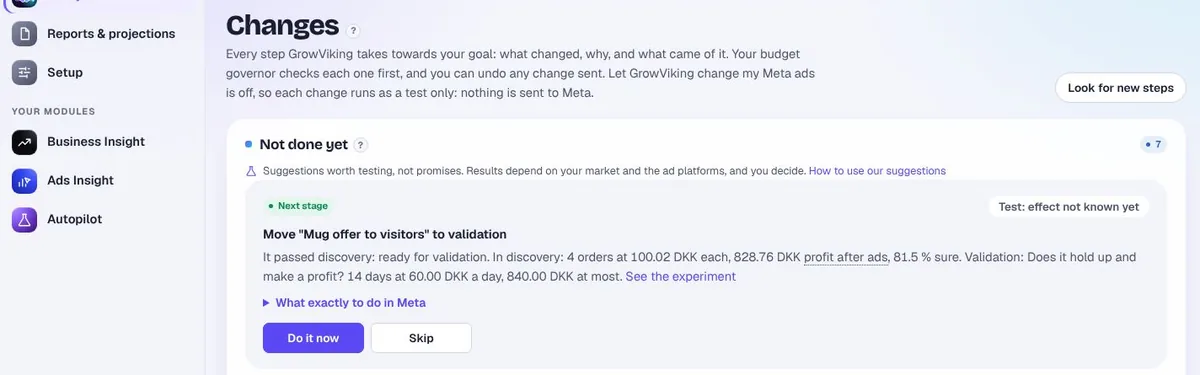
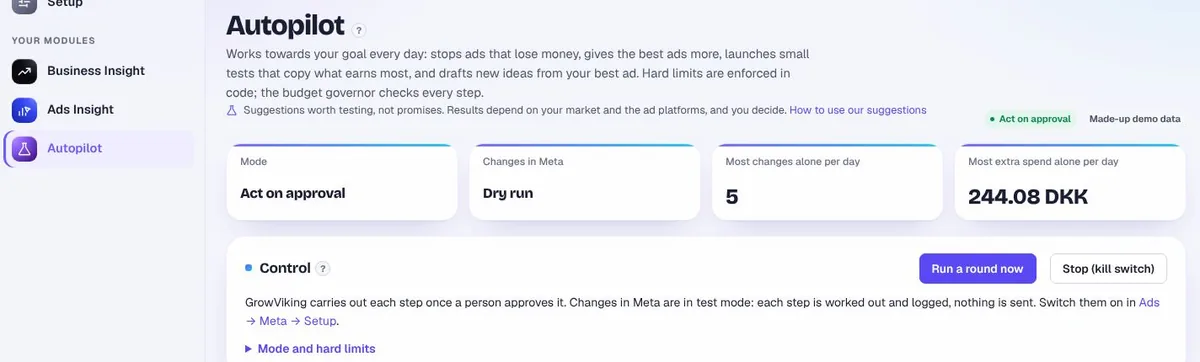
Choose how far GrowViking may go. Start with insights only. Nothing changes in your ads unless you switch changes on.
What happens with “Prospecting · Broad”
Guardrails on every change
The levels above are an illustration of how GrowViking behaves. Approve-each-step and Autopilot are in beta and send changes to Meta only after you switch live changes on.
Three steps to your first report.
No spreadsheets, no tracking project. You can stop and delete everything at any time.
Create your free account
Name, work email, company and a password, plus your platform and rough monthly ad spend. No card.
Connect Meta, then your store
Meta first, with read-only access. Then your Shopify or WooCommerce store, so orders can be matched to ads where the click can be traced.
Get your Ad Waste report
90 days of ads and orders are read in the background. The report opens in your account and arrives by email as a PDF.
What we ask for, and why. The free check asks Meta only for permission to read your ads and results. Your store connection reads orders and products, never names, emails or addresses for the free check. Changes in Meta need a plan that includes them, your switch for live changes and your approval. If you don’t choose a plan, the free check’s data is deleted 30 days after you start, with an email before; you can delete it yourself at any time from the link in every email.
Built for store owners, not analysts.
Big attribution suites are made for teams. GrowViking is made for the person who runs the store and the ads.
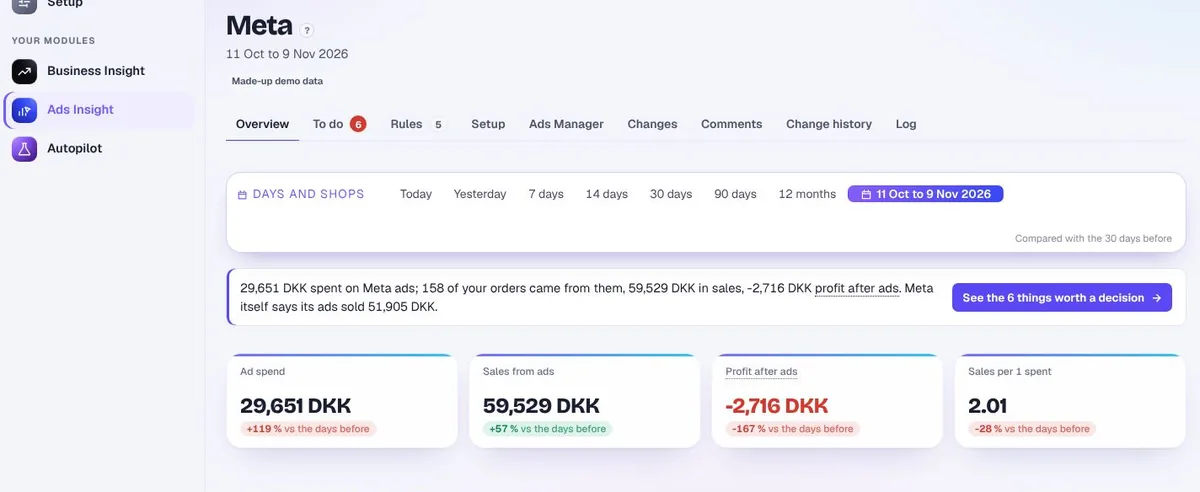
Profit, not just ROAS
Product cost, shipping, fees and ads taken off every order.
Ads and orders together
Meta’s numbers and your store’s numbers on one screen, with the differences explained.
Reasons with every suggestion
What it saw, why it matters, and how sure it is.
Why we built it
GrowViking was started in Denmark by a webshop owner who has run Meta ads for their own stores for years, and kept asking the same question every morning: which of these ads actually made money?
The answer was spread across Ads Manager, the store and a spreadsheet of costs. GrowViking brings it into one place and says what to do about it, honestly, including “wait”.
Ali JawaidFounder, GrowViking
What you can count on
- Honest suggestions: each one is worth testing, and none is a promised result.
- Your store stays as it is: orders and products are only read.
- Built for Meta ads first. TikTok ads are not part of it, and Google Ads is read-only for now. Google Ads is a read-only beta: today from Google’s campaign report file, and by sign-in once Google approves our API access. Google Ads rules and approved changes switch on after that approval.
- Profit from your own numbers: worked out from the costs you give it, never guessed.
Start free. Pay when it’s worth it.
Paid plans start with a 7-day trial. A card is needed to start it, and nothing is charged before the trial ends. Cancel any time on the Plan & billing page.
Tracking
See which ad and click each tracked order came from, and which orders could not be matched.
$19 /month
- Order-to-ad tracking
- Pixel and Conversions API checks
- Up to 300 orders a month, 1 store, 1 ad account
Base
Real profit per order, and the ad money that brings no orders.
$79 /month
- Everything in Tracking
- Profit after ads, per order and ad
- Ad Waste Check and Ads Insight
- Up to 1,000 orders a month, 1 store, 1 ad account
Growth
Everything in Base, plus approved changes to your Meta ads.
$159 /month
- Everything in Base
- Approve-each-step changes in Meta (beta)
- Google Ads rules and approved changes (beta, after Google’s API approval)
- Up to 1,500 orders a month, 2 stores, 2 ad accounts
Scale
Everything in Growth, plus Autopilot and room for more stores.
$449 /month
- Everything in Growth
- Autopilot with hard limits (beta)
- Unlimited orders, 10 stores, 5 ad accounts
Prices per month, excluding VAT. You are billed in your shop’s currency when it is EUR, DKK, SEK, NOK, GBP or USD, otherwise in EUR. Customers in Denmark, and EU customers without a valid EU VAT number, pay 25% VAT on top; EU businesses with a valid VAT number and customers outside the EU pay none. Yearly billing is on the full price page.
Before you connect anything.
What does GrowViking actually do?
It reads your Meta ads and your store’s orders and costs, matches orders to ads where the click can be traced (and shows the orders it could not match), and shows which campaigns make money after costs, which need a closer look, and which are too new to judge. Each suggestion comes with its reasons.
Do I need to be good at advertising?
No. Findings are written in plain words and ranked by money at stake. If you are an expert, every number behind them is one click away.
Does it work with Shopify or WooCommerce?
WooCommerce connects with the GrowViking plugin. Shopify connects through the GrowViking app, which is in beta while it waits for its Shopify App Store listing.
Which advertising platforms are supported today?
Meta (Facebook and Instagram) is the main platform today. Google Ads is a read-only beta: today from Google’s campaign report file, and by sign-in once Google approves our API access. Google Ads rules and approved changes switch on after that approval. TikTok ads are not supported yet.
Can GrowViking change my ads without approval?
Not unless you set it up to. By default GrowViking only reads. Changes need a plan that includes them, your switch for live changes, and your approval of each step. Autopilot (beta), if you choose it, acts only inside the hard limits you set. Every change is logged, and changes GrowViking made can be reversed.
Is it safe to connect my ad account?
The free check asks Meta only for permission to read your ads and results. You can remove GrowViking’s access in Meta at any time, and delete your data from the link in every email or from your account. Read our privacy policy.
Why do Meta’s numbers and my store’s numbers differ?
Meta counts views and modelled sales; your store counts orders. Both can be right, so a gap alone is not proof of waste. The gap between Meta’s number and your store’s number is not proof of fake sales. Your store matches orders by the ad’s click tags, so a buyer who saw the ad and came back another way is not counted here. GrowViking shows both numbers and says which one each decision should use.
Does GrowViking guarantee more profit?
No. It gives insights and suggestions, not promises. Results depend on your products, your market and the ad platforms, and you decide what to do.
How does the free Ad Waste Check work?
Create a free account, connect Meta and then your Shopify or WooCommerce store. 90 days of ads and orders are read in the background; the report opens in your account and arrives by email as a PDF. It covers one store and one Meta ad account.
What happens after the free check?
Nothing, unless you choose a plan. If you don’t, your account and data are deleted 30 days after you started, with an email before that happens. You can also delete everything straight away.
What does the trial include?
When you start a paid plan you get 7 days with everything in it, one trial per business. You see the price and the day of the first charge, then add a card. Nothing is charged before the trial ends.
Can I cancel?
Yes, yourself, on the Plan & billing page. Your plan runs to the end of the period you paid for, and nothing more is charged.
Talk to us for 15 minutes and see your own ads.
We connect your shop and your Meta ads on the call. You see your real profit after ads and your first three moves. No obligation.
No sales pitch. If it is not for you, we say so.
Know what your advertising money is doing.
Find what deserves attention before you spend another day guessing.
Get my free Ad Waste Check- Free, no card
- Read-only
- Delete any time